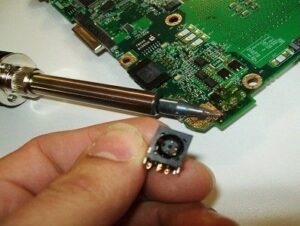
LAPTOP DC CHARGING SOCKET & USB SOCKET REPLACEMENT
If your laptop does not charge correctly or the socket is loose there is a good chance it needs replacing.
DC jack failure is very very common on all laptop’s this is because the jack socket is a wearing part and due to the nature of taking the socket in and out etc they very often wear out and need to be replaced, the most common signs that your DC socket is damaged and needs to be replaced are shown below, the problem can present in a few ways so there may be other symptons than shown below but these are the most common.
- Laptop will not charge
- Charger has to be positioned just right to get unit to charge
- unit will not turn on
- Charging light cuts in and out
- Unit will not power on when mains is connected and the battery is removed
- Charge socket has to be wiggled to charge
GPU FAILURE, LAPTOP DISPLAY IS CORRUPT & DISTORTED
If your laptops display is corrupt or blank there is a good chance your GPU is failing, I.T. Repair Guru’s specialise in these repairs.
GPU failure is very common amongst all laptops, it can present itself in many different ways and is caused by many different things, the main reasons for GPU ( Graphics Card ) failure is the laptop overheating and burning itself out although this is the main reason it can also be caused by extensive use, blocked vents & blocked fans.
Overheating is often caused by the laptop being used incorrectly or on surfaces that are not ideal for the laptop, for example on the sofa, bed or indeed on your lap!, laptops need to be used on hard surfaces in order to avoid them over heating and allow them to breathe.
Below are the main symptoms of GPU failure on a laptop, it can present itself in different ways so there may be symptoms not shown below but the GPU may still be to blame.
- Corrupt display
- Lights & sound working but no display ( blank screen )
- A series of flashing lights when the unit is turned on
- A series of beeps when the unit is turned on
- The screen going blank during periods of use
- The screen becoming corrupt during periods of use


LIQUID DAMAGE TO YOUR LAPTOP
If your laptop or PC has encountered a liquid spill I.T. Repair Guru’s can get you back up and running.
If you have spilt liquid in or on your laptop you need to seek some expert advice ASAP if there is going to be any chance of saving your unit, from cups of coffee, glasses of water and bottles of wine we have seen it all here at I.T. Repair Guru’s and our team of expert engineers are waiting to help out.
If your laptop has had a slight splash of liquid to a full glass it must be looked at ASAP, it is essential that if your laptop does encounter water damage you must act immediately in the following way.
- Turn the unit of (If not already off)
- Remove all power supplies
- Remove the battery straight away
- Try to dry off any excess liquid immediately
- Contact our expert team for advice
SMASHED, CRACKED OR DAMAGED SCREEN
I.T. Repair Guru’s are able to diagnose and replace any laptop screen.
Laptop screens are extremely delicate and do not withstand much before they give and break, if you have a broken or damaged laptop screen why not let I.T. Repair Guru’s assess the damage and replace the screen for you, our screen replacement service is second to none and we are sure you will agree.
Is your screen physically damaged? the most common cause of a damaged screen is accidentally shutting the lid when something is on the keyboard, there are several ways of damaging the screen as they are a delicate part of the laptop.
The easiest way to tell if the screen is damaged are as follows, it is pretty obvious if the screen is cracked and damaged as this will show up as just black spots and a visible crack on the screen. The screen may also not come on at all if it is damaged, they can also display funny coloured lines and strange symbols etc if the screen is damaged.


LAPTOP OVERHEATING, GETTING VERY HOT
Overheating is a very common fault in all brands of Laptop, I.T. Repair Guru’s can resolve this.
Overheating is the main cause of many problems that laptop users must deal with, if your unit is getting very hot during operation it will effect it in several ways, some of these you may see the effects of and others you may not see the effects of.
When a unit is overheating it will begin to run slower than it normally would, this can cause the unit to be slow and sluggish when performing everyday simple tasks, invisible damage will also be occurring within various components on the motherboard, if the unit is left overheating for a long period of time failure of the unit is inevitable.
I.T. Repair Guru’s would recommend getting the unit serviced by our team of experts as soon as you can after noticing the unit over heat, this will reduce the risk of long lasting damage and also allow the laptop to run as it should and keep at a low operating temperature, our service consists of several important parts the main ones being, compound replacement, silicon pad replacement, full compressed air dust out, full strip down and rebuild & a free software check.
RANDOM BLUE SCREEN ERROR MESSAGES
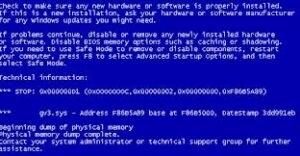
Regular blue screens could be a sign of many things, we can diagnose the problem FREE of charge.
Is your laptop suffering from blue screen errors? does the unit begin to load in to the OS but never quite get there? these can happen at anytime and usually do not have a set pattern, however occassionally they can become predictable and certain actions can cause them, rather than treading on eggshells each and everytime you plan to do some work on your laptop let us get you back up and running.
Random blue screen errors can be caused by a number of things, it is often difficult to pin point exactly what is causing the error but through our expertise and series of test equipment and software I.T. Repair Guru’s is able to successfully diagnose these issues and get your laptop back up and running smoothly.

BROKEN OR WORN PLASTICS & METAL CASINGS
We can replace any broken plastics and cases.
Has your laptop taken a nasty knock, been dropped, dented or scratched?? if so and the plastics or metal housings have been damaged etc it is best to get them replaced asap, this is not just for cosmetic reasons but also for structural reasons.
The majority of laptops rely on a strong base to keep the whole unit in good shape, the base is an integral part of the laptop as it houses all of the parts and keeps the laptop strong and ready for use, from supporting the screen to the motherboard and hard drive.
Replacing plastics and casings is a fairly inexpensive repair but it could save you a lot of money in the long run, the reason for this is the longer you leave a damaged base etc the worse it will get, this usually leads to more and more parts being required to put the unit right.
I.T. Repair Guru’s can replace any broken base, or casing whether for structural reasons or whether for cosmetic reasons, get in touch today for a quote.
VIRUS DETECTION & REMOVAL
Has your machine got a virus or malicious software? I.T. Repair Guru’s can detect and remove any of these harmful viruses.
Viruses are an ever increasing threat these days, every-time we are online we are exposing ourselves to the risk of a virus and we can never truly be safe and get away from them despite the antivirus protection that we use.
Virus & malware are a real nuisance and can often cause a lot of damage to a machine let alone what other details they may be looking at and using, from a simple virus to a in depth virus they are all as bad as one another and should be treated as a serious issue.
If you machine begins to act erratically, slow or even displaying strange messages or running software that you did not install it could be a sign that you may have a virus, in this case you should try to limit the use of the machine as much as possible and then get the mahcine to us so that we can detect and destroy the virus and get the machine back up and running.


SOFTWARE & OPERATING SYSTEM RELATED ISSUES
Having problems with your operating system? or problems with getting certain programs working properly, let our expert team tackle these issues for you.
Software issues can be extremely annoying, whether it is just a small glitch where something is not quite doing as it should or a major complication where the application keeps closing or fails to run at all.
Software issues can be caused or be influenced by many factors, the best way to deal with these is to allow I.T. Repair Guru’s team of experts have a look at the unit and take advantage of our FREE diagnostic service, we can then provide a quote to put things back in order.
I.T. Repair Guru’s offer software solutions in store or at your home or business premises, after experiencing an issue and making contact with our team we can make a decision on which option is best depending on the problem that you are experiencing.